Using BigQuery for Multi-Property Hotel Data
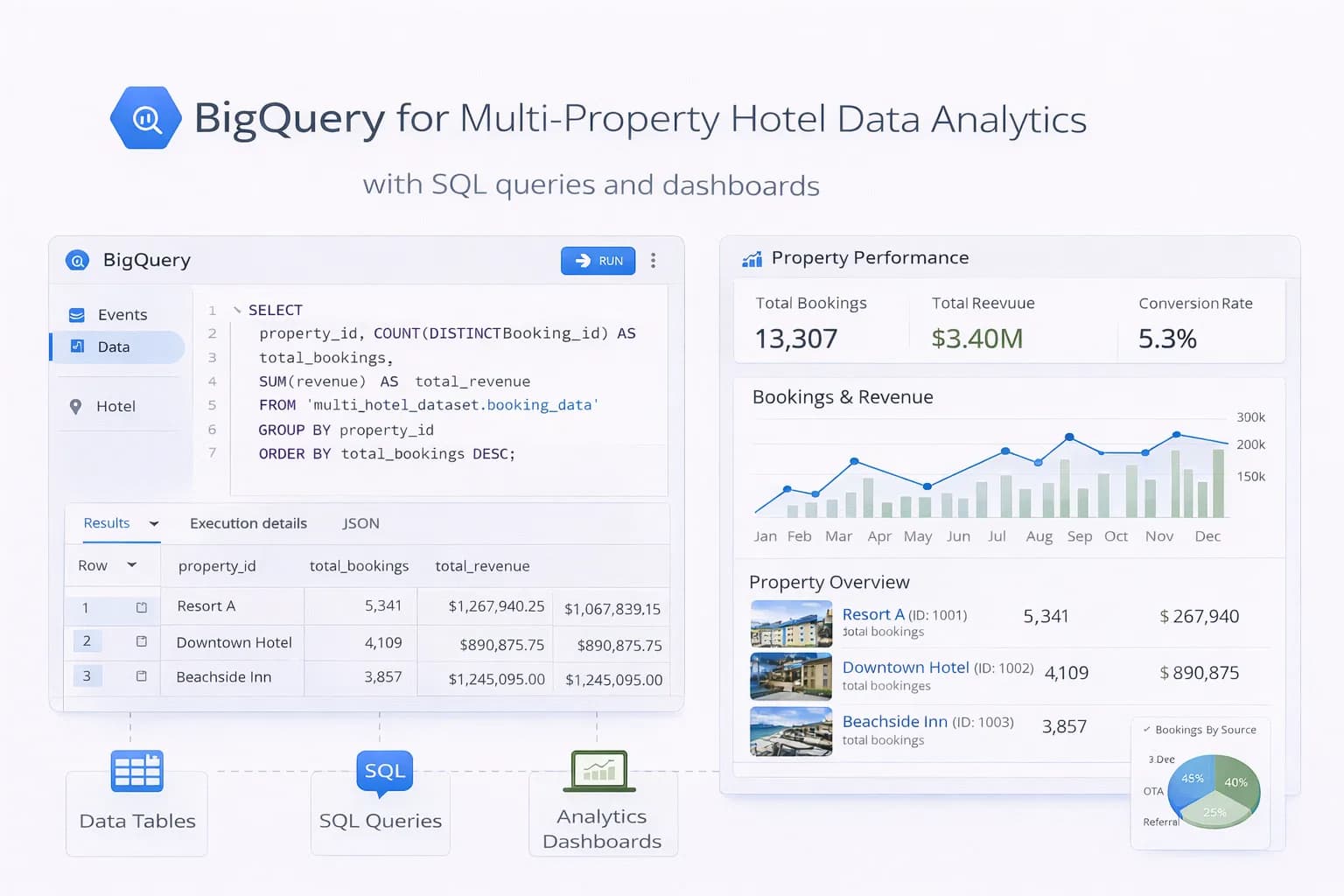
Hotel groups struggle with fragmented data—GA4 in one place, booking engine exports somewhere else, PMS/CRM in spreadsheets. BigQuery fixes this by giving you a single warehouse where every booking, session and guest touchpoint lines up by date, property and channel.
This guide shows how to set up BigQuery for multi-property analytics: schema design, GA4 export, booking/PMS ingestion, governance, and the exact scorecards leaders need.
1) What BigQuery solves for hotels
- One source of truth: GA4, booking engine, PMS, CRM, rates/promos.
- Speed at scale: query millions of rows in seconds.
- Reliable reporting: brand vs non-brand, property vs group, OTA vs direct.
- Sharing: feed Looker Studio / BI and our Analytics Dashboard.
Docs worth bookmarking:
2) Data model for multi-property (copy this)
Create a star schema: one facts table per domain/process, several dimensions to join on.
Facts
f_ga4_sessions(from GA4 export)f_bookings(booking engine / PMS confirmations)f_rate_updates(optional; daily ADR/rate cards)f_campaign_costs(Google Ads/Meta/Microsoft)
Dimensions
d_property(id, name, city, country, brand)d_channel(organic, paid search, social, email, OTA)d_date(calendar + fiscal attributes)d_utm(source/medium/campaign mapping rules)
Partition facts by date; cluster by property_id and channel to keep queries cheap. See partitioned tables and clustered tables.
3) GA4 → BigQuery export (the backbone)
Turn on daily (and streaming if needed) export from GA4 to your BigQuery project.
Key references:
Normalise GA4 into a session-level table for performance:
-- Example: session summary from GA4 event export
CREATE OR REPLACE TABLE mart.f_ga4_sessions
PARTITION BY DATE(session_start)
CLUSTER BY property_id, traffic_source
AS
SELECT
  SAFE_CAST(params.value.string_value AS STRING) AS property_id,
  user_pseudo_id,
  event_date,
  MIN(IF(event_name='session_start', TIMESTAMP_MICROS(event_timestamp), NULL)) AS session_start,
  ANY_VALUE(traffic_source.source) AS source,
  ANY_VALUE(traffic_source.medium) AS medium,
  ANY_VALUE(traffic_source.name)  AS campaign,
  CONCAT(ANY_VALUE(traffic_source.source),' / ',ANY_VALUE(traffic_source.medium)) AS traffic_source,
  COUNTIF(event_name='begin_checkout') AS began_checkout,
  COUNTIF(event_name='purchase') AS purchases
FROM `ga4_export.events_*`
LEFT JOIN UNNEST(event_params) AS params
  ON params.key = 'property_id' -- emit this in GTM/dataLayer
GROUP BY 1,2,3;
Add a small custom param like property_id in your GTM dataLayer so sessions/bookings map cleanly to each hotel.

4) Bring in bookings (engine/PMS)
Set up a daily ingestion from your booking engine and PMS (CSV/SFTP/API). Standardise fields:

transaction_id, property_id, check_in, check_out, value, currency, rate_code, channel

Optional add-ons: parking, breakfast, voucher codes

Land files in Cloud Storage, then load to stg_bookings and merge into f_bookings:

sql
Copy code
MERGE mart.f_bookings T
USING stg.stg_bookings S
ON T.transaction_id = S.transaction_id
WHEN MATCHED THEN UPDATE SET
  value = S.value, updated_at = CURRENT_TIMESTAMP()
WHEN NOT MATCHED THEN INSERT ROW;
Docs:

<a href="https://cloud.google.com/bigquery/docs/loading-data-cloud-storage" target="_blank" rel="noopener">Load data from Cloud Storage</a> • <a href="https://cloud.google.com/bigquery/docs/scheduling-queries" target="_blank" rel="noopener">Scheduled queries</a>

5) Tie GA4 to bookings (assist + last click)
Two practical joins:

A) Same-session purchases (last non-direct)
Join GA4 purchase events to your f_bookings by transaction_id (ideal when booking engine passes it back).

B) Assisted journeys
Window back 7–30 days from check_in or purchase_date to include assists from organic/location guides and email.

sql
Copy code
-- Assisted revenue by channel (30d lookback)
SELECT
  s.property_id,
  s.traffic_source,
  SUM(b.value) AS assisted_revenue
FROM mart.f_ga4_sessions s
JOIN mart.f_bookings b
  ON s.user_pseudo_id = b.user_pseudo_id
 AND s.session_start BETWEEN TIMESTAMP_SUB(b.purchase_ts, INTERVAL 30 DAY) AND b.purchase_ts
GROUP BY 1,2
ORDER BY assisted_revenue DESC;
6) Normalise channels (make PPC/Meta fair)
Create a channel mapping rule-set (regex on source, medium, campaign) so “cpc”, “paid”, “ppc” resolve to Paid Search; “(not set)” issues become Direct only when truly direct. Keep rules in d_utm and apply via a view.

For spend, ingest monthly Google Ads/Meta/Microsoft cost exports to f_campaign_costs. Tie cost→revenue per property to report tROAS accurately.

7) Scorecards leadership actually needs
Power your <Link href="/tools/analytics-dashboard">Analytics Dashboard</Link> or BI with these group + property views:

Revenue / 1k sessions by channel and entrance page type (location guide, rooms, offers)

Direct vs OTA share by property and month

Brand vs non-brand revenue split (join to query rules)

Geo mix (country → revenue/ADR) for international campaigns

Funnel: Home → Rooms/Offers → Begin Checkout → Purchase (drop-offs by device)

Pair with <Link href="/blog/measuring-roi-of-hotel-seo">Measuring the ROI of Hotel SEO</Link> to align metrics with finance.

8) Audiences & activation (optional but powerful)
BigQuery feeds high-fidelity audiences back to ad platforms:

High-intent non-purchasers: began checkout + viewed parking/rooms; no purchase in 7 days.

International planners: 2+ sessions from countries ≠ hotel country.

High-ADR lookalikes: purchasers above ADR threshold in last 180 days.

Export to GA4 audiences or directly to Google Ads Customer Match where compliant. See <Link href="/blog/ga4-audience-remarketing-hotels">GA4 Audiences for Remarketing</Link>.

9) Governance: keep it clean and private
PII: never store emails/phone numbers in GA4 export; keep PII only in secure CRM tables with access control.

Access: give view rights to marketing; edit to data owners.

Cost control: partition/cluster, avoid SELECT *, use materialized views for common metrics (<a href="https://cloud.google.com/bigquery/docs/materialized-views-intro" target="_blank" rel="noopener">materialized views</a>).

Documentation: table dictionary and a simple “How we attribute” note in your <Link href="/resources/guides">Resources</Link> area.

10) QA checklist (run every month)
GA4 export landed for each day; no gaps.

Booking files processed; MERGE success; no duplicate transaction_id.

Channel mapping changes reviewed (new campaigns/vendors).

Revenue totals reconcile with PMS/finance (± accepted variance).

Dashboards refresh under 30 seconds.

11) How to measure success
Reporting reliability: fewer “Direct” spikes after cross-domain fixes (see <Link href="/blog/track-cross-domain-bookings-hotels">cross-domain guide</Link>).

Decision speed: executives get property vs group roll-ups in one link.

Activation: audiences built from warehouse data reduce CPA and lift tROAS.

Finance alignment: group-wide direct vs OTA share published monthly.

<div className="my-10"> <BlogPrimaryCTA href="/contact">Need a BigQuery build for your group?</BlogPrimaryCTA> </div>
FAQ
<FAQSection
faqs={[
{
question: "Do we need streaming export from GA4?",
answer: "Daily export is enough for most hotels. Use streaming if you need near-real-time dashboards or same-day campaign optimisation."
},
{
question: "What if our booking engine won’t send transaction IDs to GA4?",
answer: "Join on user/session keys with a time window (assisted model) and push for a roadmap to include transaction_id. As a fallback, ingest confirmed bookings daily and reconcile."
},
{
question: "Will BigQuery be expensive for a small group?",
answer: "Not if you partition/cluster and avoid SELECT *. Most groups run comfortably in the free tier or low double-digit £/mo, then scale with usage."
}
]}
/>

Conclusion
BigQuery turns scattered hotel data into a trustworthy, fast analytics layer for every property. Export GA4 cleanly, ingest bookings/PMS nightly, standardise channels, and publish a small set of group + property scorecards. Keep governance tight and costs low with partitions—and use the warehouse to power audiences that finish the booking.

<BlogPrimaryCTA href="/contact">Build your hotel data warehouse</BlogPrimaryCTA>

Kiril Ivanov
Performance Marketing Specialist
Kiril Ivanov is a digital marketing specialist with experience managing local, national and international campaigns for businesses ranging from growing independent companies to major consumer brands. His background includes leading advertising automation work for Michael Kors and working on campaigns involving Canon, Dormeo, esure, DLG Group, Village Gym, Cameron House, Crerar Hotels, Cromlix Hotel, Harrison Fund and the Advertising Standards Authority. His experience spans paid search, paid social, advertising automation, SEO, conversion optimisation and wider digital strategy across hospitality, retail, financial services, professional services and other competitive sectors.
View author profile →Related Hotel Marketing Guides
Continue with related topics to build a complete strategy.