Using BigQuery for Multi-Property Hotel Data
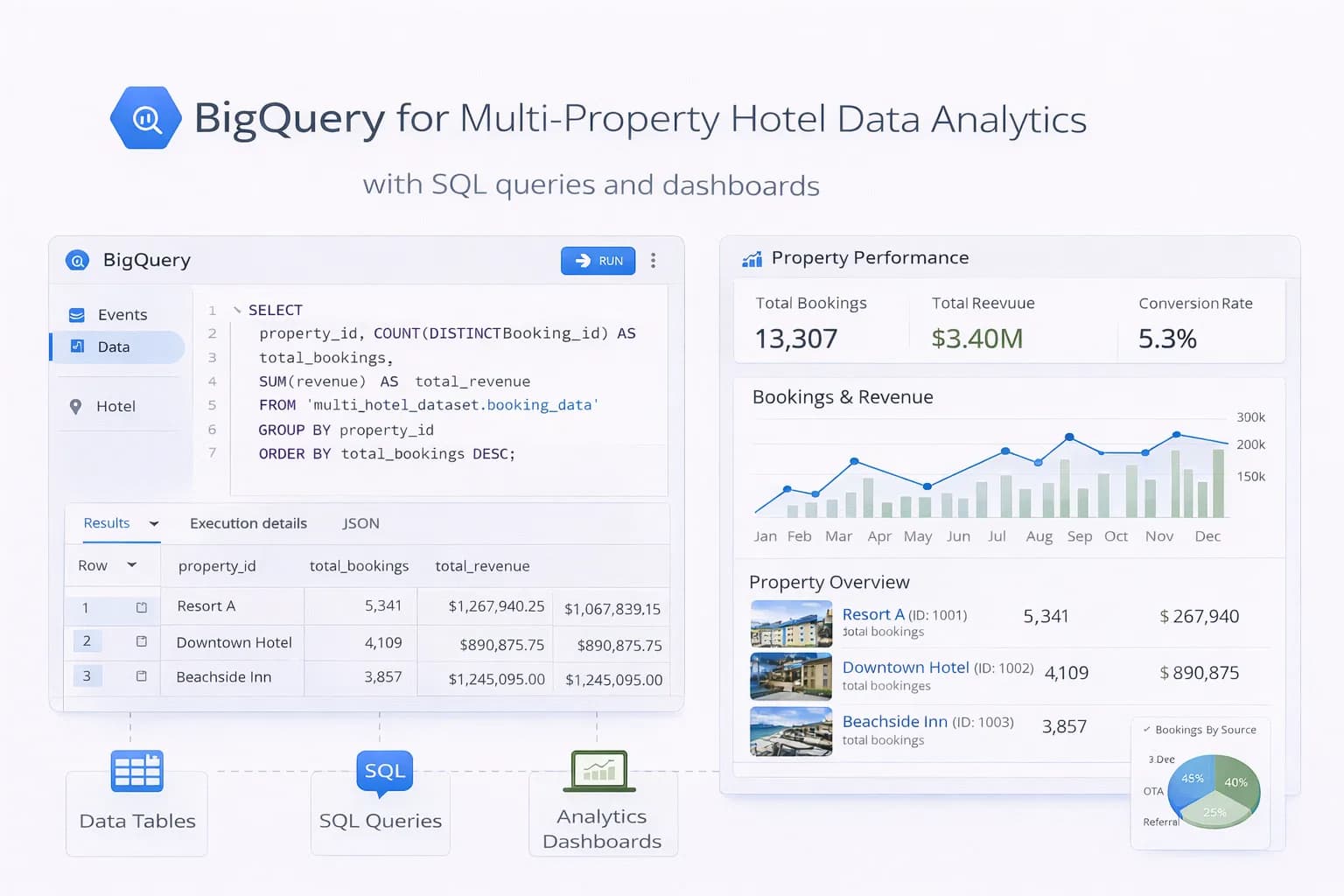
Hotel groups struggle with fragmented data—GA4 in one place, booking engine exports somewhere else, PMS/CRM in spreadsheets. BigQuery fixes this by giving you a single warehouse where every booking, session and guest touchpoint lines up by date, property and channel.
This guide shows how to set up BigQuery for multi-property analytics: schema design, GA4 export, booking/PMS ingestion, governance, and the exact scorecards leaders need.
1) What BigQuery solves for hotels
- One source of truth: GA4, booking engine, PMS, CRM, rates/promos.
- Speed at scale: query millions of rows in seconds.
- Reliable reporting: brand vs non-brand, property vs group, OTA vs direct.
- Sharing: feed Looker Studio / BI and our Analytics Dashboard.
Docs worth bookmarking:
2) Data model for multi-property (copy this)
Create a star schema: one facts table per domain/process, several dimensions to join on.
Facts
f_ga4_sessions(from GA4 export)f_bookings(booking engine / PMS confirmations)f_rate_updates(optional; daily ADR/rate cards)f_campaign_costs(Google Ads/Meta/Microsoft)
Dimensions
d_property(id, name, city, country, brand)d_channel(organic, paid search, social, email, OTA)d_date(calendar + fiscal attributes)d_utm(source/medium/campaign mapping rules)
Partition facts by date; cluster by property_id and channel to keep queries cheap. See partitioned tables and clustered tables.
3) GA4 → BigQuery export (the backbone)
Turn on daily (and streaming if needed) export from GA4 to your BigQuery project.
Key references:
Normalise GA4 into a session-level table for performance:
-- Example: session summary from GA4 event export
CREATE OR REPLACE TABLE mart.f_ga4_sessions
PARTITION BY DATE(session_start)
CLUSTER BY property_id, traffic_source
AS
SELECT
  SAFE_CAST(params.value.string_value AS STRING) AS property_id,
  user_pseudo_id,
  event_date,
  MIN(IF(event_name='session_start', TIMESTAMP_MICROS(event_timestamp), NULL)) AS session_start,
  ANY_VALUE(traffic_source.source) AS source,
  ANY_VALUE(traffic_source.medium) AS medium,
  ANY_VALUE(traffic_source.name)  AS campaign,
  CONCAT(ANY_VALUE(traffic_source.source),' / ',ANY_VALUE(traffic_source.medium)) AS traffic_source,
  COUNTIF(event_name='begin_checkout') AS began_checkout,
  COUNTIF(event_name='purchase') AS purchases
FROM `ga4_export.events_*`
LEFT JOIN UNNEST(event_params) AS params
  ON params.key = 'property_id' -- emit this in GTM/dataLayer
GROUP BY 1,2,3;
Add a small custom param like property_id in your GTM dataLayer so sessions/bookings map cleanly to each hotel.

4) Bring in bookings (engine/PMS)
Set up a daily ingestion from your booking engine and PMS (CSV/SFTP/API). Standardise fields:

transaction_id, property_id, check_in, check_out, value, currency, rate_code, channel

Optional add-ons: parking, breakfast, voucher codes

Land files in Cloud Storage, then load to stg_bookings and merge into f_bookings:

sql
Copy code
MERGE mart.f_bookings T
USING stg.stg_bookings S
ON T.transaction_id = S.transaction_id
WHEN MATCHED THEN UPDATE SET
  value = S.value, updated_at = CURRENT_TIMESTAMP()
WHEN NOT MATCHED THEN INSERT ROW;
Docs:

<a href="https://cloud.google.com/bigquery/docs/loading-data-cloud-storage" target="_blank" rel="noopener">Load data from Cloud Storage</a> • <a href="https://cloud.google.com/bigquery/docs/scheduling-queries" target="_blank" rel="noopener">Scheduled queries</a>

5) Tie GA4 to bookings (assist + last click)
Two practical joins:

A) Same-session purchases (last non-direct)
Join GA4 purchase events to your f_bookings by transaction_id (ideal when booking engine passes it back).

B) Assisted journeys
Window back 7–30 days from check_in or purchase_date to include assists from organic/location guides and email.

sql
Copy code
-- Assisted revenue by channel (30d lookback)
SELECT
  s.property_id,
  s.traffic_source,
  SUM(b.value) AS assisted_revenue
FROM mart.f_ga4_sessions s
JOIN mart.f_bookings b
  ON s.user_pseudo_id = b.user_pseudo_id
 AND s.session_start BETWEEN TIMESTAMP_SUB(b.purchase_ts, INTERVAL 30 DAY) AND b.purchase_ts
GROUP BY 1,2
ORDER BY assisted_revenue DESC;
6) Normalise channels (make PPC/Meta fair)
Create a channel mapping rule-set (regex on source, medium, campaign) so “cpc”, “paid”, “ppc” resolve to Paid Search; “(not set)” issues become Direct only when truly direct. Keep rules in d_utm and apply via a view.

For spend, ingest monthly Google Ads/Meta/Microsoft cost exports to f_campaign_costs. Tie cost→revenue per property to report tROAS accurately.

7) Scorecards leadership actually needs
Power your <Link href="/tools/analytics-dashboard">Analytics Dashboard</Link> or BI with these group + property views:

Revenue / 1k sessions by channel and entrance page type (location guide, rooms, offers)

Direct vs OTA share by property and month

Brand vs non-brand revenue split (join to query rules)

Geo mix (country → revenue/ADR) for international campaigns

Funnel: Home → Rooms/Offers → Begin Checkout → Purchase (drop-offs by device)

Pair with <Link href="/blog/measuring-roi-of-hotel-seo">Measuring the ROI of Hotel SEO</Link> to align metrics with finance.

8) Audiences & activation (optional but powerful)
BigQuery feeds high-fidelity audiences back to ad platforms:

High-intent non-purchasers: began checkout + viewed parking/rooms; no purchase in 7 days.

International planners: 2+ sessions from countries ≠ hotel country.

High-ADR lookalikes: purchasers above ADR threshold in last 180 days.

Export to GA4 audiences or directly to Google Ads Customer Match where compliant. See <Link href="/blog/ga4-audience-remarketing-hotels">GA4 Audiences for Remarketing</Link>.

9) Governance: keep it clean and private
PII: never store emails/phone numbers in GA4 export; keep PII only in secure CRM tables with access control.

Access: give view rights to marketing; edit to data owners.

Cost control: partition/cluster, avoid SELECT *, use materialized views for common metrics (<a href="https://cloud.google.com/bigquery/docs/materialized-views-intro" target="_blank" rel="noopener">materialized views</a>).

Documentation: table dictionary and a simple “How we attribute” note in your <Link href="/resources/guides">Resources</Link> area.

10) QA checklist (run every month)
GA4 export landed for each day; no gaps.

Booking files processed; MERGE success; no duplicate transaction_id.

Channel mapping changes reviewed (new campaigns/vendors).

Revenue totals reconcile with PMS/finance (± accepted variance).

Dashboards refresh under 30 seconds.

11) How to measure success
Reporting reliability: fewer “Direct” spikes after cross-domain fixes (see <Link href="/blog/track-cross-domain-bookings-hotels">cross-domain guide</Link>).

Decision speed: executives get property vs group roll-ups in one link.

Activation: audiences built from warehouse data reduce CPA and lift tROAS.

Finance alignment: group-wide direct vs OTA share published monthly.

<div className="my-10"> <BlogPrimaryCTA href="/contact">Need a BigQuery build for your group?</BlogPrimaryCTA> </div>
FAQ
<FAQSection
faqs={[
{
question: "Do we need streaming export from GA4?",
answer: "Daily export is enough for most hotels. Use streaming if you need near-real-time dashboards or same-day campaign optimisation."
},
{
question: "What if our booking engine won’t send transaction IDs to GA4?",
answer: "Join on user/session keys with a time window (assisted model) and push for a roadmap to include transaction_id. As a fallback, ingest confirmed bookings daily and reconcile."
},
{
question: "Will BigQuery be expensive for a small group?",
answer: "Not if you partition/cluster and avoid SELECT *. Most groups run comfortably in the free tier or low double-digit £/mo, then scale with usage."
}
]}
/>

Conclusion
BigQuery turns scattered hotel data into a trustworthy, fast analytics layer for every property. Export GA4 cleanly, ingest bookings/PMS nightly, standardise channels, and publish a small set of group + property scorecards. Keep governance tight and costs low with partitions—and use the warehouse to power audiences that finish the booking.

<BlogPrimaryCTA href="/contact">Build your hotel data warehouse</BlogPrimaryCTA>

Kiril Ivanov
Специалист по дигитален маркетинг
Кирил Иванов е специалист по дигитален маркетинг с опит в управлението на локални, национални и международни кампании за широк спектър от бизнеси — от независими компании до водещи потребителски марки. Неговият професионален опит включва ръководене на проекти за автоматизация на рекламата за Michael Kors и работа по кампании за Canon, Dormeo, esure, DLG Group, Village Gym, Cameron House, Crerar Hotels, Cromlix Hotel, Harrison Fund и Advertising Standards Authority (ASA). Опитът му обхваща платено търсене (PPC), платени социални мрежи, автоматизация на рекламата, SEO, оптимизация на процента на конверсия (CRO) и цялостна дигитална стратегия в хотелиерството, ритейла, финансовите и професионалните услуги.
Виж профила на автора →Свързани ръководства за хотелски маркетинг
Продължете със свързани теми, за да изградите пълна стратегия.